From LinkedIn Search to Qualified Lead: How LiReach Works
Finding leads on LinkedIn sounds simple.
Search for a keyword. Apply a few filters. Find people who look relevant. Add them to your list. Start outreach.
But anyone who has done B2B prospecting knows the reality is very different.
A LinkedIn search can return hundreds or thousands of people, but only a small percentage may actually fit your Ideal Customer Profile (ICP). And even when someone matches your basic criteria, they may not have a relevant problem, the right role, or any reason to start a conversation right now.
That’s why LiReach takes a different approach.
Instead of relying on a single lead-discovery method, LiReach gives you multiple ways to discover leads and then uses AI to qualify them against your ICP before they move forward in your lead-generation workflow.
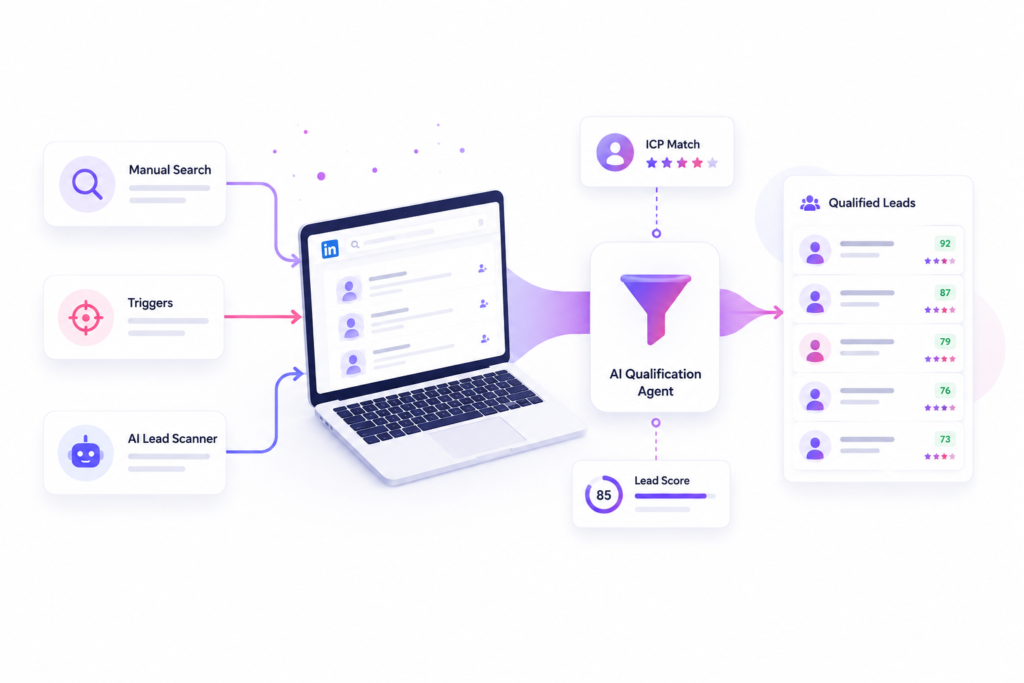
You can discover leads manually, through specific triggers, or automatically through AI Lead Scanners.
The process looks like this:
Discover → Extract → Qualify → Score → Prioritize → Outreach
Let’s look at how each part works.
Why Lead Discovery Is More Than Finding People
Traditional LinkedIn prospecting usually focuses on finding people who match filters such as:
- Location
- Industry
- Job title
- Company size
- Company
- Seniority
These filters are useful, but they don’t necessarily tell you whether someone is a good prospect for your business.
Imagine you sell a sales automation platform.
You search LinkedIn for:
“VP Sales”
You might find hundreds of people.
But which ones should you actually contact?
One might work at a 10-person company with no outbound sales team.
Another might work at a 500-person enterprise with a completely different buying process.
Another might be actively building a sales team and looking for ways to generate more pipeline.
All three have the same basic job title.
But they are not equally valuable leads.
This is why LiReach separates lead discovery from lead qualification.
You can discover leads from multiple sources, but before they become meaningful prospects in your workflow, LiReach’s AI Qualification Agent checks how well they match your ICP.
The Three Ways to Discover Leads With LiReach
LiReach provides three primary approaches to lead discovery:
1. Manual Lead Discovery
Use LinkedIn Search to find exactly the audience you want.
2. Trigger-Based Lead Discovery
Define events or activities that should automatically create new leads.
3. AI Lead Scanner
Let LiReach continuously scan relevant sources and discover potential prospects automatically.
Each method solves a different problem.
Manual discovery gives you control.
Triggers give you timing.
AI Lead Scanners give you continuous discovery.
And across all three methods, LiReach’s qualification layer helps determine whether the lead actually fits your target.
1. Manual Lead Discovery: Start With LinkedIn Search
Sometimes you already know exactly who you want to target.
Maybe you want:
“Founders of US SaaS companies with 20–100 employees.”
Or:
“VP Sales at B2B technology companies in the UK.”
In this situation, manual lead discovery gives you complete control over the search.
You can use the normal LinkedIn search experience, enter relevant keywords, and apply the filters available to you.
Depending on LinkedIn’s available filters, you can narrow your search using information such as:
- Location
- Industry
- Company
- Job title
- School
- Connections
- Keywords
- Other available search criteria
The idea is simple:
Search → Filter → Review → Select
Once you are satisfied with your search results, you can copy the LinkedIn search URL and add it to LiReach’s Manual Lead Scraper.
LiReach can then process the search results and add the discovered leads to your lead list.
Example: Finding SaaS Founders
Imagine you’re selling an AI sales tool.
Your target audience is:
- SaaS companies
- 20–200 employees
- United States
- Founder or CEO
You could create a LinkedIn search based on these criteria.
Once you’re happy with the results, you provide the search URL to LiReach.
LiReach extracts the relevant leads from that search and adds them to your lead list.
But this is where LiReach becomes different from a simple lead scraper.
A lead being extracted does not automatically mean it is a qualified lead.
LiReach Automatically Qualifies Your Discovered Leads
After a lead enters your LiReach lead list, the AI Qualification Agent evaluates the lead against your ICP.
It can analyze available information such as:
- Job title
- Company
- Industry
- Company size
- Location
- Profile information
- Relevant business context
- ICP requirements
- Other available lead data
The AI then determines how closely the lead matches your target.
For example:
Lead A
Title: VP Sales
Company: B2B SaaS
Employees: 120
Location: United States
ICP Match: Strong
Lead B
Title: VP Sales
Company: Local retail business
Employees: 25
Location: United States
ICP Match: Weak
A traditional scraping tool may simply add both leads.
LiReach goes further.
The qualification agent evaluates them against your ICP so your lead list becomes more useful and your team can prioritize the prospects that actually fit.
Discover Leads From LinkedIn Posts
Manual discovery in LiReach isn’t limited to LinkedIn search pages.
You can also use LinkedIn post URLs.
This is especially useful when you want to discover people who have already interacted with a specific topic, company, announcement, or conversation.
You can provide the URL of a LinkedIn post, and LiReach can extract people who have interacted with that post through available engagement signals, such as:
- Reactions
- Comments
- Reshares
Those people can then be added to your lead list.
This opens up an entirely different prospecting strategy.
Instead of searching only for:
“Who has this job title?”
You can search for:
“Who is already engaging with content related to this topic?”
Example: Find People Engaging With a Relevant Post
Imagine you provide cybersecurity software for financial institutions.
A cybersecurity company publishes a LinkedIn post about:
“The growing security challenges facing modern banks.”
Instead of manually checking everyone who interacted with that post, you can provide the post URL to LiReach.
LiReach extracts the available engagement participants and adds them as potential leads.
Then the qualification agent checks them against your ICP.
You might discover that:
- 200 people interacted with the post
- 80 match your industry requirements
- 35 match your target job roles
- 12 have strong ICP fit
Now you aren’t working with 200 random interactions.
You have a much more focused set of potential prospects.
2. Trigger-Based Lead Discovery: Find Leads When Something Happens
Manual prospecting is useful when you know who you want.
But what if you want LiReach to find leads based on what is happening in the market?
That’s where trigger-based lead discovery comes in.
Instead of searching for people once, you define a condition that should trigger lead discovery.
For example:
“When someone posts about [specific keyword], add them as a lead.”
Or:
“When a company posts a job for [specific role], find the relevant people and add them.”
Or:
“When people engage with this type of content, discover and evaluate them.”
This changes your prospecting strategy from:
Search → Find → Contact
to:
Wait for Signal → Discover → Qualify → Contact
Trigger Example 1: Someone Posts About a Specific Keyword
Suppose you’re selling an AI recruitment platform.
You may want to find companies or decision-makers talking about:
“Hiring challenges”
or:
“Recruitment automation”
You can create a trigger around a relevant keyword.
When a relevant post appears, LiReach can identify the person associated with that activity and add them to your lead list.
The qualification agent then evaluates whether that person fits your ICP.
This is powerful because the prospect is not being selected randomly.
They have already demonstrated some connection with a topic related to your product.
Trigger Example 2: A Company Posts a Relevant Job
Job postings can reveal what’s happening inside a company.
Imagine your product helps companies scale their sales operations.
One of your ICP criteria is:
Companies actively expanding their sales team.
A company suddenly posts jobs for:
- 10 Account Executives
- 5 SDRs
- 2 Sales Managers
That can be a meaningful growth signal.
LiReach can use a trigger around relevant job postings and identify companies showing that behavior.
Those prospects can then enter the lead list and go through AI qualification.
The result:
Job Signal → Company Discovery → Lead Discovery → ICP Qualification
Instead of waiting for a company to fill out a form or visit your website, you’re using a visible business event as a reason to investigate the account.
Trigger Example 3: Someone Posts About a Specific Problem
Suppose you sell a lead-generation platform.
Your target audience frequently talks about:
“We need more qualified leads.”
You can use a trigger around relevant keywords or topics.
When someone publishes a post that matches your trigger, LiReach can identify the person and add them to your lead list.
The qualification agent then checks:
Does this person actually fit my ICP?
A marketing manager from a company outside your target market may not qualify.
A founder of a 50-person B2B SaaS company actively discussing pipeline problems may be a much stronger prospect.
This is the difference between keyword detection and qualified lead discovery.
3. AI Lead Scanner: Let LiReach Find Leads Automatically
The third approach is the most automated.
With AI Lead Scanners, you don’t need to manually search LinkedIn every day or define every individual prospect yourself.
Instead, you define what you’re looking for.
The AI Lead Scanner can continuously look for relevant opportunities based on your targeting requirements and signals.
The scanner can search for potential prospects and identify situations that match your defined criteria.
When it finds a potential lead, the lead can be added to your LiReach lead pipeline.
Then the AI Qualification Agent checks it.
This creates a continuous loop:
Scan → Discover → Qualify → Add → Prioritize
How AI Lead Scanners Work
Think of your AI Lead Scanner as a research agent.
You give it a goal.
For example:
“Find US-based B2B SaaS companies with 20–200 employees whose founders are actively talking about outbound sales challenges.”
The scanner can continuously look for relevant opportunities.
When it identifies a potential match, it doesn’t simply assume the prospect is qualified.
The lead goes through the qualification process.
This means the scanner can focus on discovery, while the qualification agent focuses on fit.
Example: An AI Lead Scanner for a Sales Tool
Imagine you’re selling a LinkedIn sales automation platform.
Your ICP:
Industry: B2B SaaS
Employees: 20–200
Location: US
Buyer: Founder, CEO, VP Sales
Problem: Difficulty generating qualified pipeline
Signal: Hiring salespeople or discussing outbound growth
Your AI Lead Scanner can look for companies and people where these characteristics and signals come together.
Suppose the scanner discovers:
Company: ABC SaaS
Employees: 75
Location: US
New activity: Hiring 5 SDRs
Relevant executive: VP Sales
Signal: Sales expansion
The lead is discovered.
Then LiReach’s qualification agent checks it against the ICP.
If the lead has strong alignment, it can move forward for your sales process.
The Qualification Layer Is What Makes LiReach Different
Lead discovery alone is not enough.
You can generate thousands of leads and still have a poor sales pipeline.
The real challenge is determining:
Which leads are actually worth your time?
That’s why every discovery method in LiReach works with the qualification layer.
Whether your lead comes from:
LinkedIn Search
A LinkedIn Post
A Trigger
An AI Lead Scanner
the lead can go through AI-powered qualification.
The agent evaluates the lead against the ICP you have created.
This creates a consistent qualification standard across your entire prospecting system.
Your ICP Becomes the Brain Behind Lead Discovery
Remember the ICP we discussed earlier?
It is not just a document.
LiReach can use your ICP as a decision-making layer.
Your ICP can define:
- Target industries
- Company size
- Geography
- Business model
- Job titles
- Decision-makers
- Pain points
- Use cases
- Technology usage
- Buying signals
- Other relevant characteristics
When a new lead appears, LiReach can compare the available information against those criteria.
This creates a simple but powerful principle:
The better your ICP, the more intelligently your lead-generation system can identify relevant prospects.
One ICP, Multiple Discovery Strategies
A major advantage of LiReach is that you don’t have to choose only one way to find leads.
You can combine methods.
For example:
Manual
You manually search for your ideal accounts on LinkedIn.
Trigger
You create a trigger for companies hiring relevant roles.
AI Scanner
Your AI Lead Scanner continuously searches for prospects showing relevant activity.
All three methods can feed into the same lead list and qualification workflow.
This gives your sales system both precision and scale.
A Complete Example
Let’s imagine you run a SaaS company selling AI-powered customer support software.
Your ICP is:
Company
- B2B SaaS
- 50–500 employees
- US and UK
Buyer
- Head of Customer Support
- VP Customer Success
- COO
Pain Point
- High support volume
- Slow response times
- Rising support costs
Signals
- Hiring customer support representatives
- Rapid customer growth
- Launching new products
- Talking about support scalability
Now look at how you could use LiReach.
Manual Discovery
Search LinkedIn for:
“VP Customer Success”
Apply your filters.
Copy the LinkedIn search URL.
Give it to LiReach.
LiReach extracts the leads.
The AI qualification agent checks them against your ICP.
Trigger Discovery
Set a trigger for:
Companies hiring customer support representatives.
When a relevant company posts a job, LiReach identifies the opportunity and adds relevant prospects.
The qualification agent checks them.
AI Lead Scanner
Set up an AI Lead Scanner to continuously find:
B2B SaaS companies experiencing rapid customer growth and showing signs of increasing customer-support requirements.
The scanner finds potential opportunities.
The qualification agent checks them.
Now you have three different discovery mechanisms feeding one intelligent lead pipeline.
From Lead Discovery to Qualified Lead
The entire LiReach process can be summarized as:
1. Discover
Find potential leads through LinkedIn Search, LinkedIn posts, triggers, or AI Lead Scanners.
2. Extract
Collect the relevant lead and company information.
3. Qualify
LiReach’s AI Qualification Agent compares the lead against your ICP.
4. Score
The lead is evaluated based on how relevant it is to your target.
5. Prioritize
Stronger prospects can receive more attention than weak matches.
6. Outreach
Use the qualified lead and available context to create a more relevant sales conversation.
So instead of:
Search → Export → Spam
LiReach creates:
Discover → Qualify → Prioritize → Personalize → Outreach
The Goal Isn’t More Leads. It’s Better Leads.
Modern B2B sales teams don’t need another spreadsheet filled with thousands of names.
They need a system that can continuously answer:
Who should we contact?
Why are they relevant?
What changed?
Why now?
How closely do they match our ICP?
That’s exactly where LiReach’s lead discovery system is designed to help.
Whether you want full control through manual LinkedIn searches, timely opportunities through triggers, or continuous discovery through AI Lead Scanners, LiReach connects each method to the same AI qualification layer.
Your lead source may change.
Your qualification standard doesn’t.
Build Your Lead Discovery Engine With LiReach
LiReach turns LinkedIn prospecting from a one-time search activity into a continuous lead discovery system.
You can start with a manual search when you already know your audience.
You can create triggers when you want to capture prospects based on specific events.
Or you can let AI Lead Scanners continuously search for opportunities that match your ICP and signals.
Every route leads back to the same principle:
Find the right people. Match them against your ICP. Understand why they may be relevant. Then focus your outreach where it matters.
That’s how LiReach moves from simply finding LinkedIn leads to helping you discover qualified sales opportunities.