How LiReach Automates LinkedIn Outreach Without Losing Personalization
LinkedIn outreach becomes difficult when you try to scale it.
Sending 20 personalized messages is manageable.
Sending hundreds of messages every week while keeping every message relevant, natural, and personalized is a completely different challenge.
Most automation tools solve this by using templates.
The problem?
Templates make outreach faster, but they often make messages feel repetitive.
For example:
“Hi {{first_name}}, I saw your profile and thought our solution could help your business. Would you be open to a quick chat?”
You can change the name.
You can change the company.
But the message still feels like the same message sent to everyone.
LiReach takes a different approach.
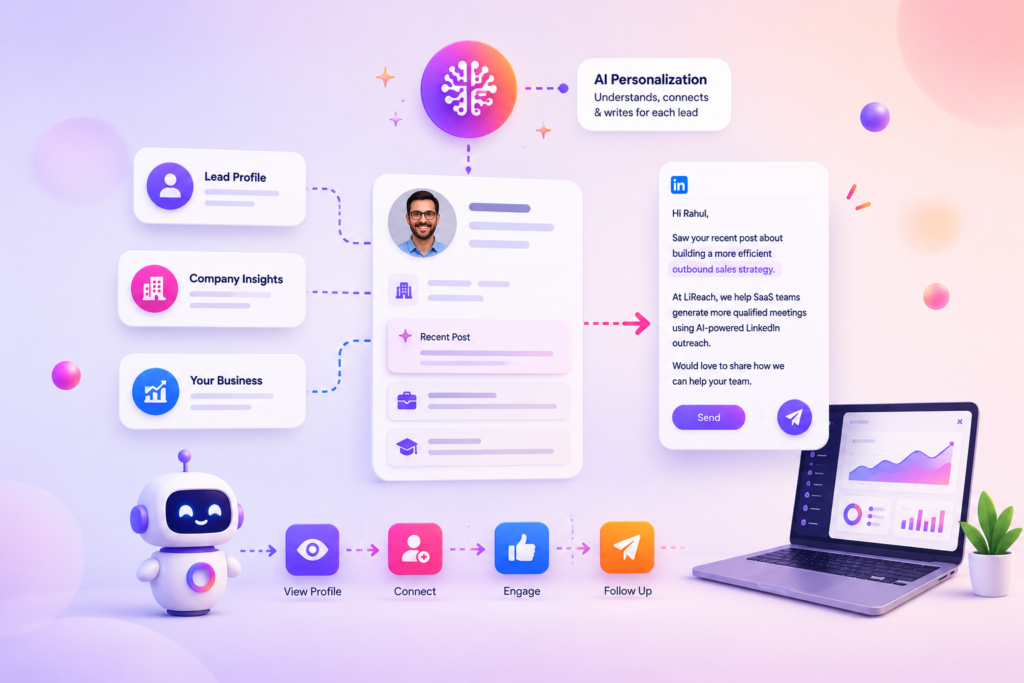
Instead of simply inserting information into a template, LiReach’s AI researches the prospect, understands their recent activity, analyzes their company, studies your own business and profile, and then creates a message specifically for that person.
The result is automated outreach with personalized context.
What Does Personalized LinkedIn Outreach Actually Mean?
Real personalization is more than adding a person’s first name.
A genuinely personalized message should answer:
Why am I contacting this person?
Why is my product relevant to them?
Why is this the right time to start the conversation?
And most importantly:
Why does this message sound like it was written specifically for them?
LiReach approaches personalization using multiple sources of information.
The AI can look at:
- The prospect’s profile
- Their recent LinkedIn activity
- Their recent posts
- Their role and responsibilities
- Their company profile
- Their company’s recent activity
- Your company information
- Your LinkedIn profile
- Your product or service
- Your preferred messaging style
- Your previous sample messages
The AI then combines these inputs before generating the outreach message.
How LiReach Personalizes Every Message
The personalization process can be thought of as five stages:
Research the Lead → Research the Company → Understand You → Find the Connection → Write the Message
Let’s break that down.
1. LiReach Researches the Lead
The first step is understanding who you’re talking to.
LiReach analyzes the available information from the prospect’s LinkedIn profile.
This may include:
- Name
- Job title
- Company
- Industry
- Professional background
- Skills
- Profile information
- Recent activity
- Recent posts
- Topics they discuss
- Other available profile context
The purpose isn’t to collect information for the sake of collecting it.
The AI is looking for conversation-worthy context.
For example, imagine your prospect is:
VP Sales at a SaaS company
Their recent LinkedIn activity might show that they are talking about:
Building a scalable outbound sales team.
That information can become much more useful than simply knowing their job title.
Instead of writing:
“Hi John, I noticed you’re the VP Sales at ABC SaaS.”
LiReach can potentially build a message around the topic the prospect is actually discussing.
That’s a much stronger starting point.
2. LiReach Looks at Recent Posts and Activity
A person’s recent LinkedIn activity can reveal what they currently care about.
Someone’s job title might stay the same for two years.
Their priorities can change every week.
That’s why recent activity is valuable.
LiReach can analyze relevant recent posts and available activity to understand:
- What topics the prospect is discussing
- What problems they’re talking about
- What initiatives they’re interested in
- What opinions they are sharing
- What changes are happening in their professional life
For example:
A Head of Growth might recently post:
“We’re expanding into the US market and building our outbound team.”
That creates a much stronger personalization opportunity than simply saying:
“I see you’re the Head of Growth.”
The first message can connect directly to something the prospect is already thinking about.
3. LiReach Researches the Prospect’s Company
The person is only one part of the context.
The company matters too.
LiReach can also analyze the prospect’s company profile and available recent company activity.
This may include:
- Company description
- Industry
- Company size
- Products or services
- Growth information
- Recent company posts
- Announcements
- Hiring activity
- Expansion activity
- Other relevant public information
Why does this matter?
Because the same person may have very different priorities depending on what is happening inside their company.
Imagine two people with the exact same job title:
VP Sales
One works at a company that just raised funding.
The other works at a company cutting costs.
Their business context is completely different.
Good personalization should understand that difference.
4. LiReach Understands Your Business
Personalization is not just about the prospect.
The AI also needs to understand you.
LiReach uses your company information and your profile information to understand:
- What you sell
- Who you serve
- What problems you solve
- Your positioning
- Your value proposition
- Your role
- Your professional background
- Your expertise
- Your company context
This allows the AI to find a meaningful connection between:
Their situation
and
Your solution
Without this step, personalization can become a collection of random facts about the prospect.
That’s not useful.
The goal is to find a reason for you specifically to contact them specifically.
5. The AI Finds the Connection
This is where the personalization engine brings everything together.
LiReach compares:
Prospect information
Prospect activity
Company information
Your profile
Your company
Your messaging style
and asks:
What is the most natural reason for this person to hear from us?
The AI then uses that context to generate the message.
For example:
Prospect
VP Sales at a B2B SaaS company
Recent Activity
Posted about difficulty generating qualified outbound meetings.
Company
Growing sales team and hiring SDRs.
Your Company
Provides AI-powered LinkedIn lead generation.
The resulting message can be built around the intersection of those facts.
That’s much more meaningful than simply inserting:
Hi John,
into a generic template.
Teach LiReach How You Write
Personalization isn’t only about what the message says.
It’s also about how the message sounds.
Different people have different communication styles.
Some prefer short and direct messages.
Some are conversational.
Some are formal.
Some use simple language.
Some prefer a curious question rather than a direct pitch.
LiReach allows you to teach the AI your preferred communication style by adding sample messages.
You can add up to 10 sample messages or message sequences.
These samples help the AI understand your:
- Writing style
- Tone
- Sentence structure
- Vocabulary
- Message length
- Level of formality
- Way of starting conversations
- Way of asking questions
- Way of presenting an offer
Think of it as giving the AI examples of:
“This is how I normally talk to prospects.”
Why Sample Messages Matter
Suppose your writing style is:
Short, conversational and direct.
For example:
“Hey Rahul, saw you’re expanding your sales team. Curious—are you currently using LinkedIn as part of your outbound process?”
Now imagine the AI knows this style.
It doesn’t have to copy the exact sentence.
Instead, it learns the pattern:
Short → Natural → Contextual → One clear question
The AI can then adapt that style to a completely different prospect.
That’s the difference between copying a template and learning a communication style.
AI Personalization vs. Template Personalization
There is a major difference.
Traditional Template
Hi {{first_name}},
I noticed you work at {{company}}.
We help companies like yours generate more leads.
Would you be interested in learning more?
The message is technically personalized.
But only the variables changed.
LiReach AI Personalization
The AI researches the prospect and creates a message based on their actual context.
For example:
“Hey Rahul, noticed your team is hiring across outbound sales. We work with B2B teams that are trying to increase qualified meetings without adding more manual prospecting. Curious—how are you currently handling LinkedIn outreach?”
This message has a reason.
It references a relevant situation.
And it creates a natural conversation opportunity.
Personalization Doesn’t Mean Making the Message Long
One common misconception about AI personalization is that the more information you include, the better the message becomes.
Usually, the opposite is true.
A good personalized message can be very short.
The AI may analyze dozens of pieces of information before writing a message of only two or three sentences.
The research can be extensive.
The message should remain simple.
Think of it as:
More research → Better context → Shorter, more relevant message
Not:
More research → Longer message
LiReach Can Personalize Different Steps in Your Sequence
Personalization doesn’t stop at the first message.
A LinkedIn outreach sequence may contain multiple messages.
For example:
Connection Request
↓
Message 1
↓
Message 2
↓
Message 3
↓
Message 4
Each message can use the context available for the prospect.
This means your outreach doesn’t have to feel like:
Message 1: Generic pitch
Message 2: “Just following up”
Message 3: “Did you see my message?”
Message 4: “Last attempt”
Instead, each step can be designed around the conversation and the information already available.
Personalization + Automated Follow-Ups
Automation becomes especially valuable when combined with personalization.
You don’t want your sales team manually researching every prospect before every follow-up.
LiReach automates the repetitive part while keeping the messaging contextual.
For example:
Lead enters sequence
→ AI researches prospect
→ AI researches company
→ AI identifies relevant context
→ AI creates Message 1
→ LinkedIn action executes
→ System waits
→ Next step runs
→ AI generates the next relevant message
This allows your team to scale outreach without manually writing every message from scratch.
Example: How LiReach Creates a Personalized Message
Imagine you’re selling a lead-generation SaaS platform.
Your ICP
B2B SaaS companies with 20–200 employees.
Prospect
Name: Ankit
Role: Founder
Company: SaaS company
Prospect Activity
Recently posted about:
Building a predictable outbound pipeline.
Company Activity
Recently announced:
Expansion into the US market.
Your Business
You help B2B SaaS companies build qualified outbound pipelines using LinkedIn.
Your Writing Style
Short, conversational, direct.
AI Personalization
LiReach connects these pieces.
Instead of sending:
“Hi Ankit, we help SaaS companies generate leads using LinkedIn.”
It can create something closer to:
“Hey Ankit, saw your post about building a more predictable outbound pipeline—and with the US expansion, I imagine that becomes even more important. Curious, are you currently scaling LinkedIn outbound internally or keeping it mostly manual?”
The message works because it has context.
The Goal Is Relevance, Not Fake Personalization
There is an important difference between personalization and pretending to know someone.
A bad AI message may say:
“I absolutely loved your recent post about sales.”
even when the post has nothing to do with the conversation.
That’s not personalization.
That’s automated flattery.
LiReach is designed around a more useful principle:
Use real available context to find a legitimate reason for the conversation.
The message should feel relevant because it is relevant.
From Lead Data to Conversation
LiReach’s personalization workflow can be summarized as:
1. Find the Lead
The prospect enters your lead list after discovery and qualification.
2. Research the Prospect
LiReach analyzes available profile information and recent activity.
3. Research the Company
The AI analyzes company information and recent activity.
4. Understand Your Business
LiReach uses your company and profile information to understand your solution and positioning.
5. Learn Your Style
Your sample messages teach the AI how you communicate.
6. Find the Relevance
The AI identifies the strongest connection between your business and the prospect.
7. Generate the Message
LiReach creates a personalized message using the available context and your preferred communication style.
8. Automate the Sequence
The message and follow-up workflow can run automatically according to your configured sequence.
The result:
Research → Understand → Personalize → Automate
Why This Matters for B2B Outreach
Scaling personalized outreach has always involved a trade-off.
You could choose:
Manual personalization
Highly personalized, but slow and difficult to scale.
Or:
Mass automation
Fast and scalable, but often generic.
LiReach is designed to bring these two sides together.
AI handles the research and message creation.
Automation handles the repetitive execution.
Your sample messages provide the communication style.
And your team can focus on the conversations that actually need a human.
Personalization at Scale
The real advantage of AI isn’t that it can write one good message.
It’s that it can perform the research and personalization process repeatedly across many leads.
Every prospect can have different:
- Role
- Company
- Recent activity
- Business priorities
- Pain points
- Context
And the AI can use those differences when generating the message.
This gives your outreach a better chance of feeling like:
“This message was written for me.”
rather than:
“This message was sent to everyone.”
Final Thoughts
Automating LinkedIn outreach doesn’t have to mean sacrificing personalization.
The real opportunity is to automate the work behind personalization.
LiReach researches the prospect.
It looks at their recent posts and available profile information.
It researches their company and recent activity.
It understands your company and your own LinkedIn profile.
You can provide up to 10 sample messages or sequences so the AI learns your preferred writing style.
Then LiReach brings those pieces together to create a message that is tailored to the individual prospect and aligned with the way you communicate.
The result is a simple idea:
You don’t need to manually write every message.
You need to give AI enough context to write the right message.
With LiReach, the goal isn’t to send more messages.
It’s to send more relevant messages, automatically, without losing the human context behind the conversation.