How LiReach Webhooks Connect Your LinkedIn Outreach to Your CRM
Stop copying leads between tools. Send qualified lead data from LiReach directly to your CRM, automation platform, or internal system.
Generating leads is only half the job.
Once a prospect becomes interested, your team needs to act quickly. Someone has to update the CRM, assign the lead, create a deal, notify the salesperson, and make sure nothing gets missed.
If your team is doing all of this manually, there is a good chance that valuable leads are sitting in LiReach while your sales team is still working somewhere else.
LiReach Webhooks solve that gap.
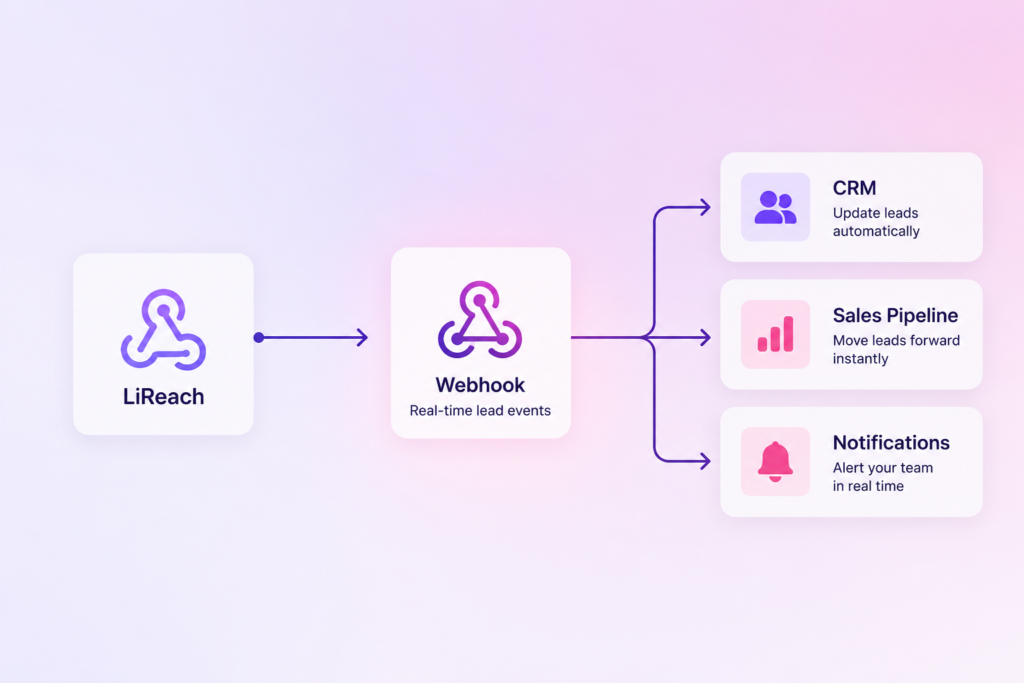
With LiReach, you can connect your lead generation and outreach workflow to your existing CRM or automation system. When an important event happens, LiReach automatically sends the lead information to the webhook you have configured.
So instead of:
LiReach → Export → Copy → CRM → Update manually
you can build:
LiReach → Webhook → CRM → Sales Workflow
It is simple, flexible, and designed to fit into the sales stack you already use.
What Is a Webhook?
A webhook is simply a way for one application to tell another application that something has happened.
For example, imagine a prospect has been talking with your AI agent and finally agrees to a meeting.
Without a webhook, someone might need to open LiReach, find the lead, copy the details, open the CRM, and update the opportunity.
With a webhook, the process can happen automatically.
Meeting is fixed
↓
LiReach triggers the webhook
↓
Lead information is sent to your CRM
↓
CRM updates the opportunity
↓
Salesperson gets the notification
The important part is that your sales team does not need to manually move the information from one system to another.
Why We Built Webhooks Into LiReach
LiReach is designed to handle much more than finding LinkedIn profiles.
The platform can help with lead discovery, AI qualification, personalization, outreach, follow ups and conversations.
But your sales process probably does not end inside LiReach.
You may already use a CRM.
You may have an n8n workflow.
You may have an internal sales dashboard.
You may have your own database or application.
We didn’t want LiReach to force you to replace those systems.
Instead, we wanted LiReach to connect with them.
That’s why we built outbound webhooks.
From LinkedIn Prospect to CRM Record
Let’s take a simple example.
Imagine you are a B2B SaaS company targeting founders and sales leaders.
Your campaign starts with thousands of potential prospects.
LiReach finds relevant people.
The AI qualification system checks whether they match your ICP.
The right prospects enter your outreach workflow.
LiReach researches their profile and company.
AI creates a personalized message.
The conversation starts.
Eventually, one prospect becomes interested and books a meeting.
At this point, the lead has moved far beyond being just another LinkedIn profile.
It is now a real sales opportunity.
This is where the webhook becomes useful.
Lead discovered
→ Lead qualified
→ Outreach started
→ Conversation
→ Lead converted
→ Meeting fixed
→ CRM updated
Your sales team can continue from there.
Choose Which Events Should Trigger Your Webhook
One of the useful things about LiReach Webhooks is that you don’t have to send every possible event to your external system.
You can choose the events that matter to your workflow.
For example, LiReach supports webhook triggers such as:
Lead Converted
Use this when a lead starts engaging with your outreach and becomes a meaningful sales opportunity.
For example, a prospect replies to your messages and starts a conversation.
Your CRM can then automatically update the lead status or create a sales opportunity.
Meeting Fixed
This is particularly useful for sales teams.
When a prospect provides meeting information or reaches the meeting stage, LiReach can send the available lead information to your connected system.
Your CRM can then move the lead into a meeting stage, assign a salesperson, or create a follow up task.
Outreach Completed
You can also trigger a webhook when the outreach or nurturing process has finished.
This can help your CRM keep track of leads that have completed the current sequence and may need another type of follow up.
What Information Does LiReach Send?
LiReach sends structured JSON data to your webhook endpoint.
Depending on the lead and event, the payload can contain information such as:
Lead name
Company name
Company website
LinkedIn profile
Mobile number
Meeting status
Meeting link
LinkedIn account used
Email account used
Event
Timestamp
This means your CRM or automation platform doesn’t just receive a notification.
It receives useful information that can be used to automatically update your sales process.
A Simple Example
Let’s say your webhook receives a Meeting Fixed event.
Your automation system can receive information similar to:
{ "event": "meeting_fixed", "timestamp": "2026-08-21T10:30:00Z", "lead": { "name": "John Doe", "email": "john@example.com", "company_name": "Example Corp", "company_website": "https://example.com", "linkedin_url": "https://linkedin.com/in/johndoe", "meeting_fixed": true, "meeting_link": "https://calendly.com/..." }}
Your CRM can then use this information to automatically update the lead.
For example:
Find existing contact
→ Update contact
→ Move opportunity to Meeting
→ Assign salesperson
→ Create follow up task
You can decide exactly what happens after LiReach sends the data.
Connect LiReach With Your CRM
The most obvious use case is sending leads directly to your CRM.
Imagine your sales team uses a CRM to manage every opportunity.
Instead of manually checking LiReach, your CRM can automatically receive important lead updates.
For example:
Before Webhooks
A prospect books a meeting.
Someone notices it in LiReach.
They copy the lead details.
They open the CRM.
They search for the contact.
They update the pipeline.
They notify the salesperson.
With Webhooks
A prospect books a meeting.
LiReach detects the event.
LiReach sends the lead data.
Your CRM updates automatically.
The salesperson gets the information.
The difference may seem small for one lead.
But when you are managing hundreds or thousands of prospects, removing these small manual tasks can save a lot of time.
Use LiReach With n8n
Webhooks become even more powerful when you connect LiReach with an automation platform such as n8n.
For example:
LiReach
↓
Webhook
↓
n8n
↓
Check whether lead exists
↓
Create or update CRM contact
↓
Create opportunity
↓
Notify sales team
You can also build more advanced workflows.
For example, when a meeting is fixed:
Meeting Fixed
→ n8n receives the event
→ Check the CRM
→ Find the company
→ Update the contact
→ Create a deal
→ Assign the salesperson
→ Send a Slack notification
→ Create a follow up task
Now your LinkedIn outreach is connected to the rest of your sales infrastructure.
Build Your Own Workflow With the LiReach API
You are not limited to a specific CRM.
If you have your own application or backend, you can create an endpoint that receives LiReach webhook events.
For example:
LiReach
↓
Your API
↓
Your Database
↓
Your Internal Dashboard
This is useful for companies that have their own sales platform or want complete control over how lead information is processed.
You can also use a webhook as the starting point for your own custom automation.
Webhooks Keep Your Sales Data Moving
One of the biggest problems with disconnected sales tools is that information gets stuck.
Your lead generation platform knows something.
Your CRM doesn’t.
Your salesperson doesn’t.
Someone eventually has to move the information manually.
Webhooks remove that unnecessary gap.
When an important event happens in LiReach, the information can immediately move to the next system.
That means your CRM can stay closer to what is actually happening inside your outreach campaigns.
Why Speed Matters When a Lead Shows Interest
Imagine a prospect replies:
“Yes, let’s discuss this. Can you send me your calendar?”
That is a very different lead from someone who has never responded.
At this point, speed matters.
You don’t want the information sitting in a dashboard waiting for someone to discover it.
You want your sales workflow to react.
With a webhook, that response can trigger your next step automatically.
For example:
Lead responds
→ LiReach updates the lead
→ Webhook fires
→ CRM updates
→ Salesperson gets notified
→ Follow up begins
This allows your team to focus on the conversation rather than managing the data around it.
Webhooks Are Not Just for Meetings
A common mistake is to think of webhooks only as a way to send meeting bookings to a CRM.
They can be used throughout the lead lifecycle.
For example:
Lead Converted
Your CRM can move the prospect into an active opportunity.
Meeting Fixed
Your CRM can create or update the deal.
Outreach Completed
Your CRM can mark the current sequence as completed.
This gives your external system more visibility into what is happening inside LiReach.
How to Set Up a LiReach Webhook
Setting up a webhook is straightforward.
Inside LiReach, open Outbound Webhooks and select Add Webhook.
You can then provide:
1. Webhook Name
Give the integration a name.
For example:
Sales CRM
n8n Lead Automation
HubSpot Sync
2. Webhook URL
Enter the endpoint where LiReach should send the data.
Your CRM or automation platform will normally provide this URL.
3. Select Your Triggers
Choose the events you want to send.
For example:
☑ Lead Converted
☑ Meeting Fixed
☑ Outreach Completed
Once the webhook is created, LiReach can start sending the selected events to your endpoint.
Built for Reliable Data Delivery
A webhook is only useful if the receiving system gets the data reliably.
That’s why LiReach includes basic delivery controls such as request timeouts and retries.
For example, if the receiving endpoint doesn’t respond properly, the system can retry the request according to the configured retry policy.
This helps reduce problems caused by temporary network issues or a receiving service being unavailable for a short period.
One Lead Can Trigger Multiple Systems
Another advantage of using webhooks is that one event can become the starting point for several actions.
Imagine a prospect books a meeting.
LiReach sends the event to n8n.
n8n can then:
Update the CRM
Notify the salesperson
Send a Slack message
Create a task
Update your internal database
Add the lead to another workflow
The webhook is simply the connection between LiReach and your automation layer.
What happens after that is completely up to you.
A Complete LiReach Lead Flow
When you combine LiReach’s lead discovery, AI qualification, outreach and webhook functionality, you can build a much more connected sales system.
Here’s a simple example:
Step 1: Find the Prospect
LiReach discovers potential prospects from LinkedIn and other lead discovery workflows.
Step 2: Qualify the Lead
AI checks the prospect against your ICP.
Step 3: Understand the Prospect
LiReach analyzes relevant profile and company information.
Step 4: Start Outreach
AI creates personalized messages and the outreach workflow begins.
Step 5: Continue the Conversation
Follow ups and conversation workflows continue based on the prospect’s activity.
Step 6: Prospect Becomes Interested
The lead reaches an important stage.
Step 7: Webhook Fires
LiReach sends the event and lead information to your connected system.
Step 8: Your Sales System Takes Over
Your CRM or automation workflow updates the opportunity and alerts the right person.
The complete flow becomes:
Discover → Qualify → Personalize → Outreach → Engage → Convert → Webhook → CRM → Close
Why We Think This Is the Right Way to Build Sales Automation
We don’t believe your sales team should have to live inside one platform.
Your lead generation tool should do what it is good at.
Your CRM should do what it is good at.
Your automation platform should do what it is good at.
Webhooks allow these systems to work together.
LiReach handles the prospecting and LinkedIn outreach.
Your CRM manages the sales pipeline.
Your automation platform connects everything together.
And your sales team focuses on what matters most: having conversations and closing deals.
Final Thoughts
Lead generation shouldn’t end with a list of LinkedIn profiles.
The real goal is to turn those profiles into conversations, opportunities and eventually customers.
That’s why LiReach Webhooks are an important part of the platform.
They allow your lead generation workflow to connect directly with the systems your sales team already uses.
When a lead converts, your CRM can know.
When a meeting is fixed, your sales team can know.
When outreach is completed, your automation system can know.
And because the data moves automatically, your team doesn’t have to spend time copying information from one platform to another.
LiReach finds the right leads.
AI helps qualify and engage them.
Webhooks move the important events into your sales system.
Your team focuses on closing the opportunity.
That’s how we think modern LinkedIn lead generation should work: not as an isolated tool, but as a connected part of your entire sales infrastructure.